Gemini Live Multimodal Engine
Talk and Show Things to AI in Real Time
A lightning-fast voice and video engine that lets you speak naturally with AI—and interrupt it anytime, just like a real phone call with a friend.
Architecture Highlights
- •Smooth microphone streaming that doesn't slow down your phone or browser.
- •Live connection to Google Gemini that stays connected automatically.
- •Lets the AI look up facts, maps, or data while talking to you.
- •Lets you interrupt the computer mid-sentence naturally, just like a human conversation.
Engineering Hurdles Solved
- •Eliminating main-thread audio buffer underruns while simultaneously decoding 1080p camera frames and rendering WebGL graphics.
- •Synchronizing dynamic tool-calling interruptions with instantaneous audio playback draining.
What is the Gemini Live Engine?
This project lets you talk out loud to Google Gemini AI in real time using your microphone and webcam. Instead of typing a question and waiting for a paragraph of text, you can chat back and forth smoothly. If the AI is explaining something and you want to ask a question, you can simply speak up and it will stop and listen immediately—just like chatting on the phone with a friend.
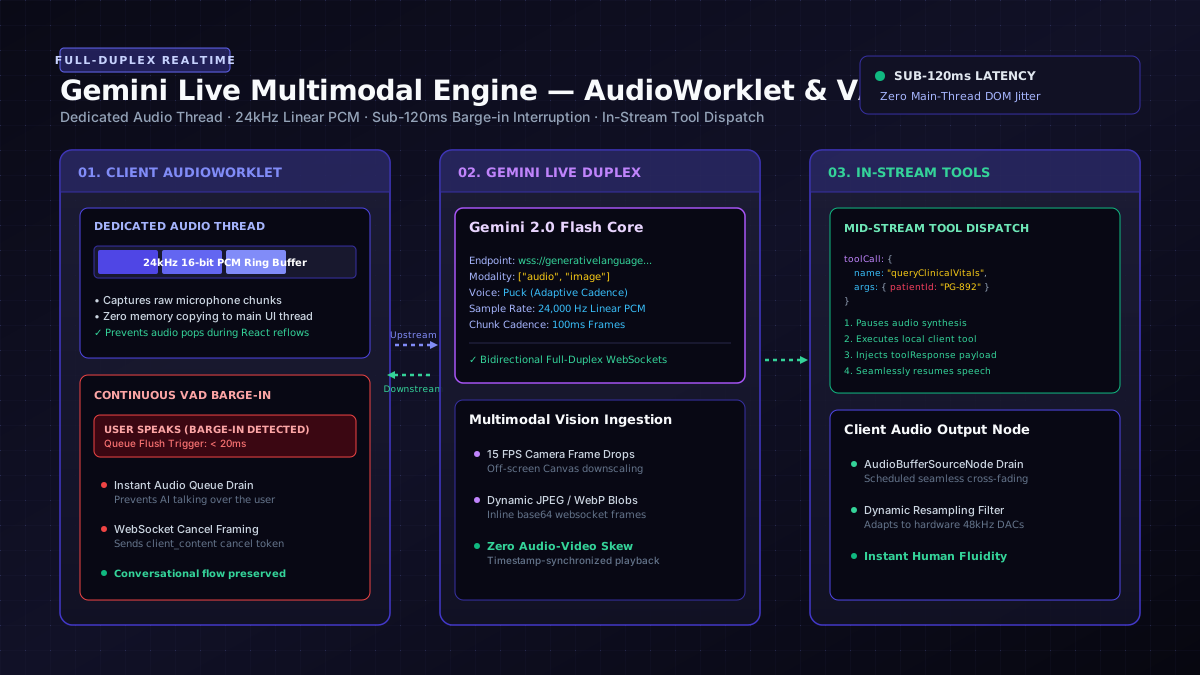
Capturing high-fidelity audio on the main JavaScript thread causes audible pops and skips whenever the DOM reflows. The Gemini Live Engine isolates audio streaming inside a dedicated Web Audio AudioWorklet operating at 24kHz 16-bit linear PCM:
- Interruption Handling: Continuous Voice Activity Detection (VAD) immediately flushes the client-side audio playback queue when the user begins speaking.
- Function Calling Mid-Stream: The model can pause its spoken audio stream, trigger a client-side tool (e.g., querying a FHIR database or taking a camera snapshot), and continue speaking without dropping the WebSocket session.
Architecture Highlights
- AudioWorklet Zero-Copy Pipeline: Captures 16kHz/24kHz raw PCM mono audio on a dedicated audio thread, avoiding main-thread UI stutter.
- Bi-directional Tool Calling: Enables the AI model to pause its audio response mid-stream, execute local browser tools (e.g. database search, map lookup, device control), and resume talking seamlessly.
- Resilient Network Framing: Handles packet jitter, network reconnection, and audio queue drain buffers for fluid, interruption-resistant voice chats.
// Initializing Gemini Live Multimodal Session
const liveClient = new GeminiLiveSession({
  model: 'gemini-2.0-flash-exp',
  config: {
    generationConfig: {
      responseModalities: ['audio'],
      speechConfig: {
        voiceConfig: { prebuiltVoiceConfig: { voiceName: 'Puck' } }
      }
    }
  }
});

await liveClient.connect();
Duplex Streaming Protocol
[USER MICROPHONE] ──► [AUDIOWORKLET (24kHz PCM)] ──► [WEBSOCKET UPSTREAM]
                                                            │
                                                            ▼
                                                   [GEMINI LIVE ENGINE]
                                                            │
                                                            ▼
[USER HEADPHONES] ◄── [JITTER BUFFER / AUDIO DECODER] ◄── [DOWNSTREAM AUDIO CHUNKS]
Explore More Systems
View full portfolio of AI architectures, creative technology, and open systems.